
SSD vs HDD: Which Storage Drive Should You Choose?
Compare SSD vs HDD speed, durability, capacity, noise, lifespan and cost for laptops, desktops, gaming, backups and long-term storage.
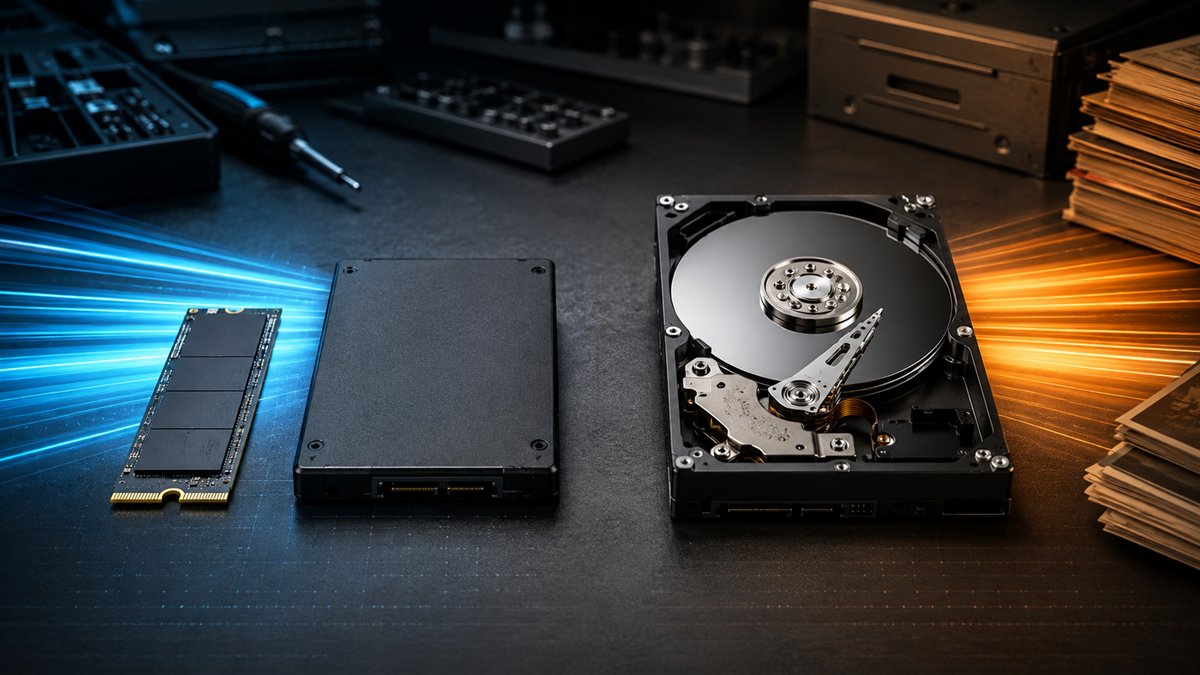
An SSD is the best default for the operating system, applications and games. An HDD can still make sense when low-cost bulk capacity matters more than speed.
SSD vs HDD comparison
| Factor | SSD | HDD |
|---|---|---|
| Speed | Much faster access and transfers | Limited by mechanical movement |
| Noise | Silent | Motor and head noise |
| Shock resistance | No moving parts | More vulnerable while operating |
| Capacity per rupee | Higher cost | Usually lower cost for large drives |
| Best use | OS, apps, active projects and games | Bulk media, local archive and backup sets |
SATA SSD, NVMe SSD and HDD
A 2.5-inch SATA SSD is limited by the SATA interface but remains a major upgrade over an HDD. An M.2 NVMe SSD uses PCI Express and can be much faster, especially for large sequential transfers and demanding workflows. An HDD uses spinning platters and is available in large capacities at a lower price per terabyte.
Which drive should you buy?
- Everyday laptop: SSD only, unless the laptop explicitly supports a second drive.
- Gaming PC: NVMe SSD for Windows and current games; optional HDD for recordings or archives.
- Creator workstation: fast SSD for active projects and separate backed-up storage for archives.
- Backup: an HDD can provide affordable capacity, but one drive is never a complete backup strategy.
Reliability and backups
Both technologies can fail without warning. SSD endurance ratings and HDD workload ratings describe different limits, but neither replaces backups. Keep at least three copies of important files, use more than one storage type where practical and keep one copy away from the computer.
Frequently asked questions
Is SSD better than HDD for gaming?
Yes for load times, updates and general responsiveness. It usually does not increase GPU-limited frame rate.
Does an SSD last longer than an HDD?
Neither has a universal lifespan. Workload, drive quality, temperature, power events and manufacturing variation all affect reliability. Keep backups.
Sources and further reading
Features, software and prices change. Confirm current details with these sources before making a decision.
Found something that needs updating? Send a correction with the page URL and a supporting source.