
RGB vs ARGB: Which PC Lighting Should You Choose?
Understand 12-volt RGB, 5-volt addressable RGB, motherboard headers and controllers before connecting a fan or light strip.
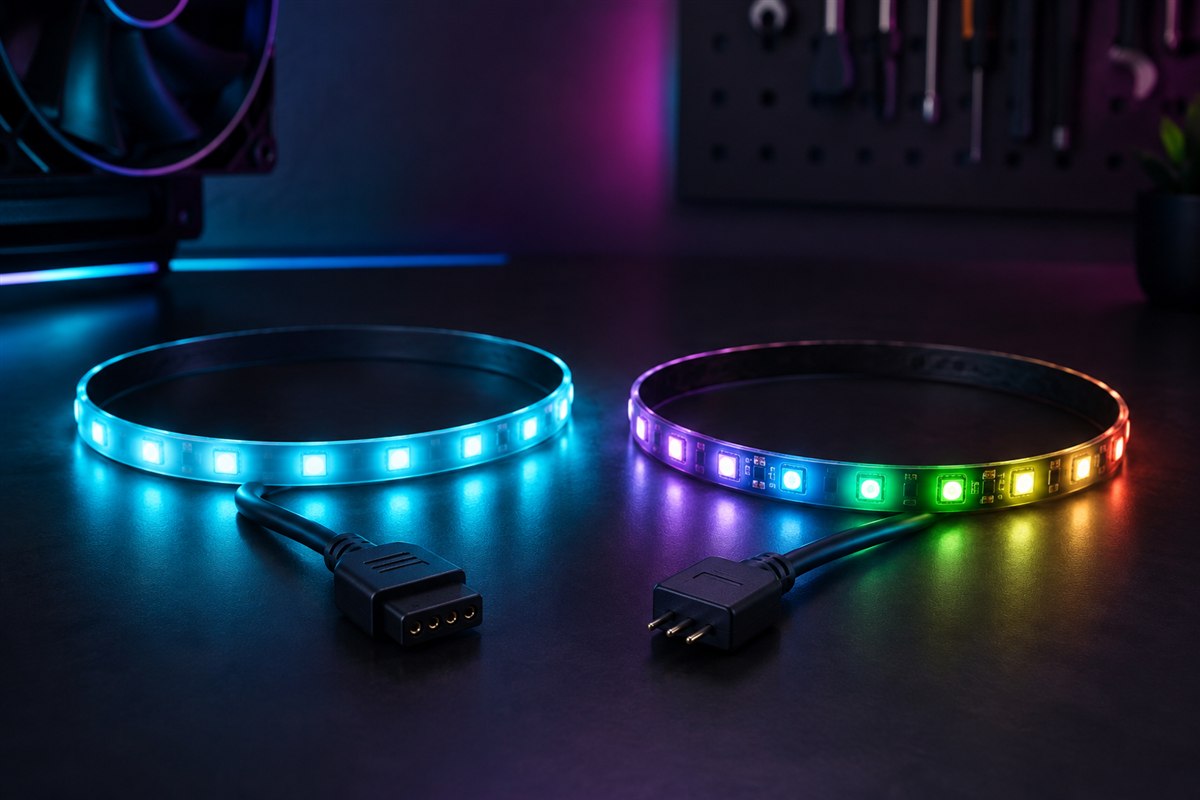
RGB and ARGB can produce similar colors, but they are electrically different systems. Conventional RGB changes an entire connected device to one color at a time. ARGB controls individual LEDs, enabling moving patterns, gradients and multiple simultaneous colors. The safest choice is the one supported by your motherboard or controller—not simply the connector that appears to fit.
RGB and ARGB compared
| Feature | RGB | ARGB |
|---|---|---|
| Typical header | 12V, four pins | 5V, three pins with one gap |
| LED control | All LEDs share one color | Each LED can be addressed |
| Effects | Static, pulse and whole-device color changes | Rainbow, chase, gradient and per-LED patterns |
| Cost and setup | Often simpler | More flexible; may need a hub or controller |
Neither standard improves cooling or gaming performance. Lighting and fan motors also use separate connections: the fan’s 3-pin DC or 4-pin PWM cable controls rotation, while its RGB or ARGB lead controls illumination.
Identify the correct motherboard header
Turn off the PC, switch off the power supply and consult the motherboard manual. A conventional RGB header is commonly labeled RGB, 12V-G-R-B or similar and has four pins. A common ARGB header may be labeled ARGB, D_LED, ADD_GEN2, JRAINBOW or 5V-D-G; it normally has three pins in a four-position layout.
Do not connect a 5V ARGB device to a 12V RGB header. The higher voltage can permanently damage its LEDs. Never force a plug, and align the voltage mark or arrow exactly as the manual shows.
Connector labels vary by manufacturer. Some brands also use proprietary connectors that require their own hub. Pin count alone is therefore a clue, not permission to connect.
Choose a control method
A compatible motherboard header lets the board’s lighting software control the device. A separate controller can add lighting to a board with no suitable header and may provide buttons, a remote or USB software control. A passive hub duplicates one signal across several outputs; a controller can provide its own effects. Check the product description so you know which you are buying.
Mixing software ecosystems can make synchronization unreliable. If coordinated effects matter, choose devices that use one supported controller or the same motherboard standard. “Compatible with” branding usually describes software support, not universal electrical compatibility.
Plan fans, hubs and power
Count lighting connectors and fan-motor connectors separately. Check the current limit printed in the motherboard manual and the current draw specified for every attached lighting device. Do not exceed the header limit. A powered hub uses SATA power from the PSU to supply multiple devices, but its signal input must still match the lighting standard.
Daisy-chaining can simplify cable management, although every product sets a supported device or LED limit. Connect one known-compatible device first, test it, then add the remaining devices. Keep cables away from fan blades and avoid connecting or disconnecting lighting while the system is powered.
Which one should you buy?
Choose RGB when you want a uniform color, have a compatible 12V header or prefer a simpler and often cheaper setup. Choose ARGB when individual-LED animations and synchronized patterns matter, and your motherboard or controller provides the correct 5V connection.
If your case or fans already include a controller, building around that ecosystem is usually easiest. If you are starting fresh, inventory the motherboard headers and decide how many illuminated devices you will run before buying. Visual flexibility is valuable only when the connectors, controller, software and power budget work together.
Frequently asked questions
Can ARGB plug into RGB?
No. Common 5V three-pin ARGB and 12V four-pin RGB systems are electrically incompatible.
Can I use an ARGB fan without an ARGB motherboard header?
Yes, if you use a compatible standalone controller or powered hub that explicitly supports the fan’s connector.
Does ARGB make fans spin faster?
No. Lighting control is separate from the fan motor’s PWM or DC speed control.
References and further reading
Check the exact motherboard, case and lighting-device manuals before connecting hardware. Send a correction if a detail needs updating.